Updated: Cdiscount / Octopia: Action Required for REST-API Migration
Update: More time was granted, so now you should finalise the steps latest until the 18th of July. Please also do not forget to configure the new event procedures for Octopia to transfer shipment and cancellation messages to Octopia for Cdiscount.
As part of Octopia's move away from a SOAP API infrastructure to a REST based API for Orders we have finalised the technical integration of the new order API. Therefore PlentyONE is now able to fetch orders via the new connection.
But now you, the sellers, need to act and reconfigure Cdiscount in order to be able to use the Cdiscount order logic without any downtime. Please make sure all the steps are done by the 9th of July because the old SOAP API could be shut down any minute since the deprecation date has been reached.
Required steps for the activation
Following steps are necessary for a seamless transition:
Check your Cdiscount Sales Channel (Sales Channels → Channels → Cdiscount/Octopia) and make sure that for every offer that is live at Cdiscount the corresponding offer listing is created and active along with the correct variation ID in PlentyONE.
For further information on how to create listing please consult the manual .
. Important - If this step is not done PlentyONE will not be able to have a connection to the items on order level.
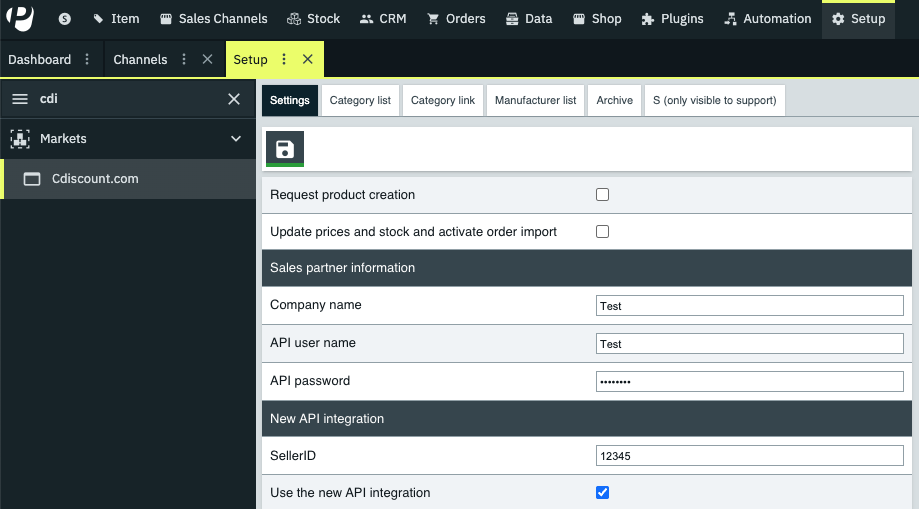
In the Old Cdiscount Settings (Setup → Markets → Cdiscount) Uncheck / Turn OFF the following checkboxes (as can be seen in this screenshot).
Request product creation
Update prices and stock and activate order import
Please verify in the Settings that ‘Use the new API Integration’ is checked/active and fill in your SellerID.
Important - ONLY keep the “Use the new API Integration Checkbox ‘active / checked’ & leave the seller ID filled in.After ‘turning off’ (Step 2&3) the old integration → Turn on the following (as can be seen in screenshot) in the NEW Sales Channel Settings (Sales Channels → Channels → Choose Sales Channel (e.g.: Cdiscount/Octopia) → Listings → Settings).
Activate/Turn ON ALL Settings in the General Tab as well as the Cdiscount Settings Tab.Make sure that the Order Import Crons are switched on .
Please also add the new events to your existing configured event procedures for Octopia shipment and cancellations. Only once you have configured this correctly, will the shipment messages and cancellations messages go out to Octopia.

 To prevent potential order fetching issues, please complete these steps without interruption!
If you have any questions or queries feel free to contact us.
Edit: After publication, the update at the very top, as well as a 5th step of required action has been added.