Enhancing the Workflow with the New Messenger UI
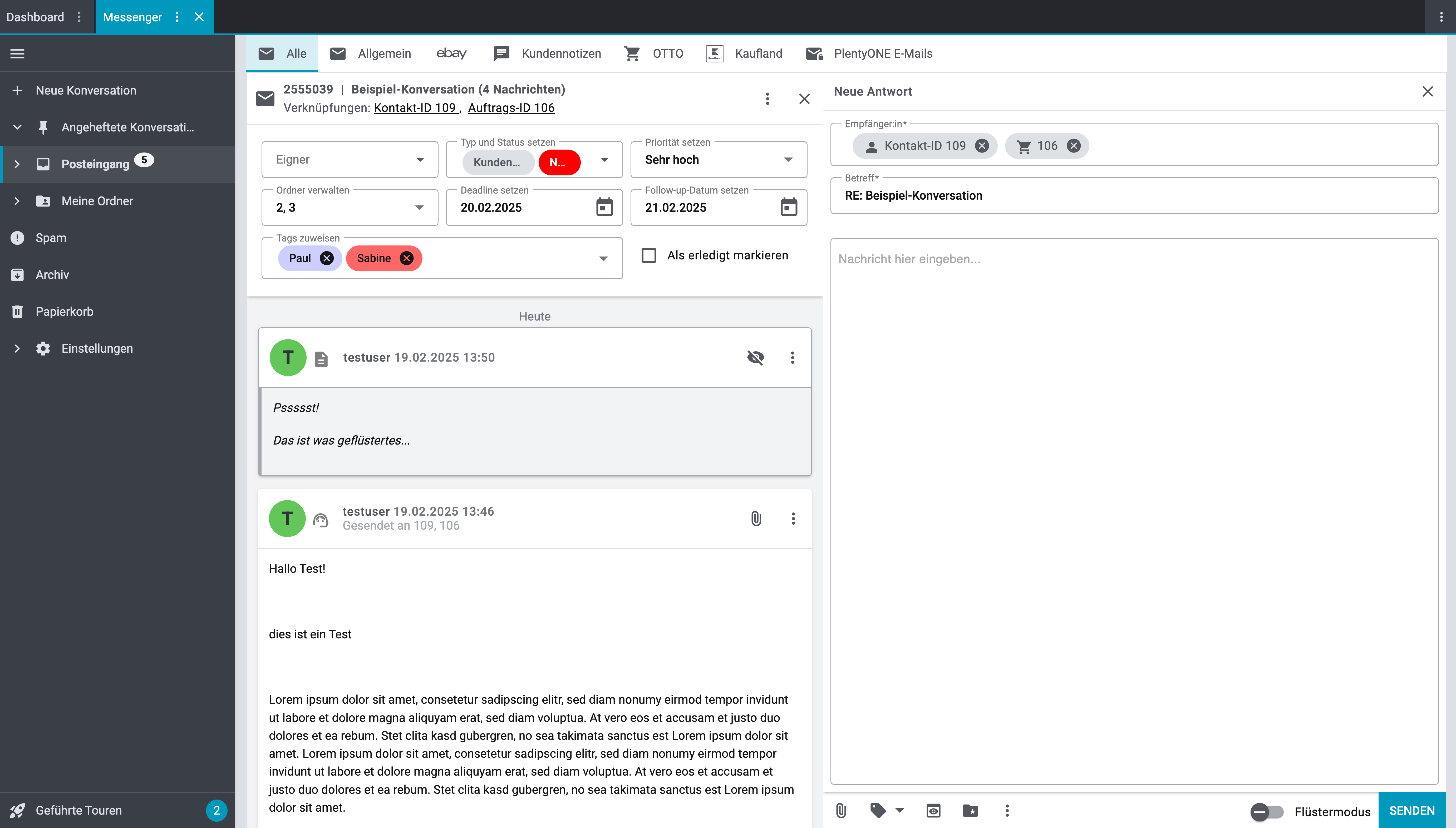
We are making important improvements to enhance your messaging experience in PlentyONE! Messenger supports you in communicating with your marketplace customers. With a focus on clarity, efficiency, and customisation, these updates will make it easier than ever to read, reply to, and manage messages seamlessly – while keeping the familiar main structure for the three parts Messenger overview, Messenger details, and the Messenger reply window.
Here is an overview of the main changes
Larger, customisable and vertical message window: We have increased the space for reading messages to give you a clearer view. Additionally, this window is horizontally customisable so you can expand it to make it easier to read longer messages.
Improved reply window with vertical layout: The reply window has been enlarged and vertically aligned to improve the usability of templates. You now have more space to conveniently load and customise templates.
Optimised actions for quick access: Frequently used actions are now located outside of the context menu, allowing for quicker access without having to open a separate menu each time. These changes allow you to make adjustments seamlessly as you work.
Whisper mode: Whisper messages are now displayed in gray, making it easier to distinguish internal messages from standard messages. This clearer distinction helps to avoid confusion when dealing with different message types.

These are the next steps
In the next weeks, our Team will work on these topics:
Updating Messenger Portlets in Contact UI and Order UI: We will also update the UI of the Messenger portlet to have consistent user experience throughout PlentyONE.
Introducing My View for Messenger Details: My View will allow you to fully customise the display to your individual needs, and easily show and hide actions as required for your workflow.
A huge thank you to our customers who provided valuable feedback and helped us shape this new UI! Your insights were instrumental in making these improvements.
The new user interface is expected to go into beta in the next few days, will be in early from 26.2.2025 and will be visible in all stable systems from 5.3.2025.
These updates ensure a smoother, more efficient workflow while maintaining the structure you know and trust. Stay tuned! 
Do you have questions about Messenger? Please get in touch with us.